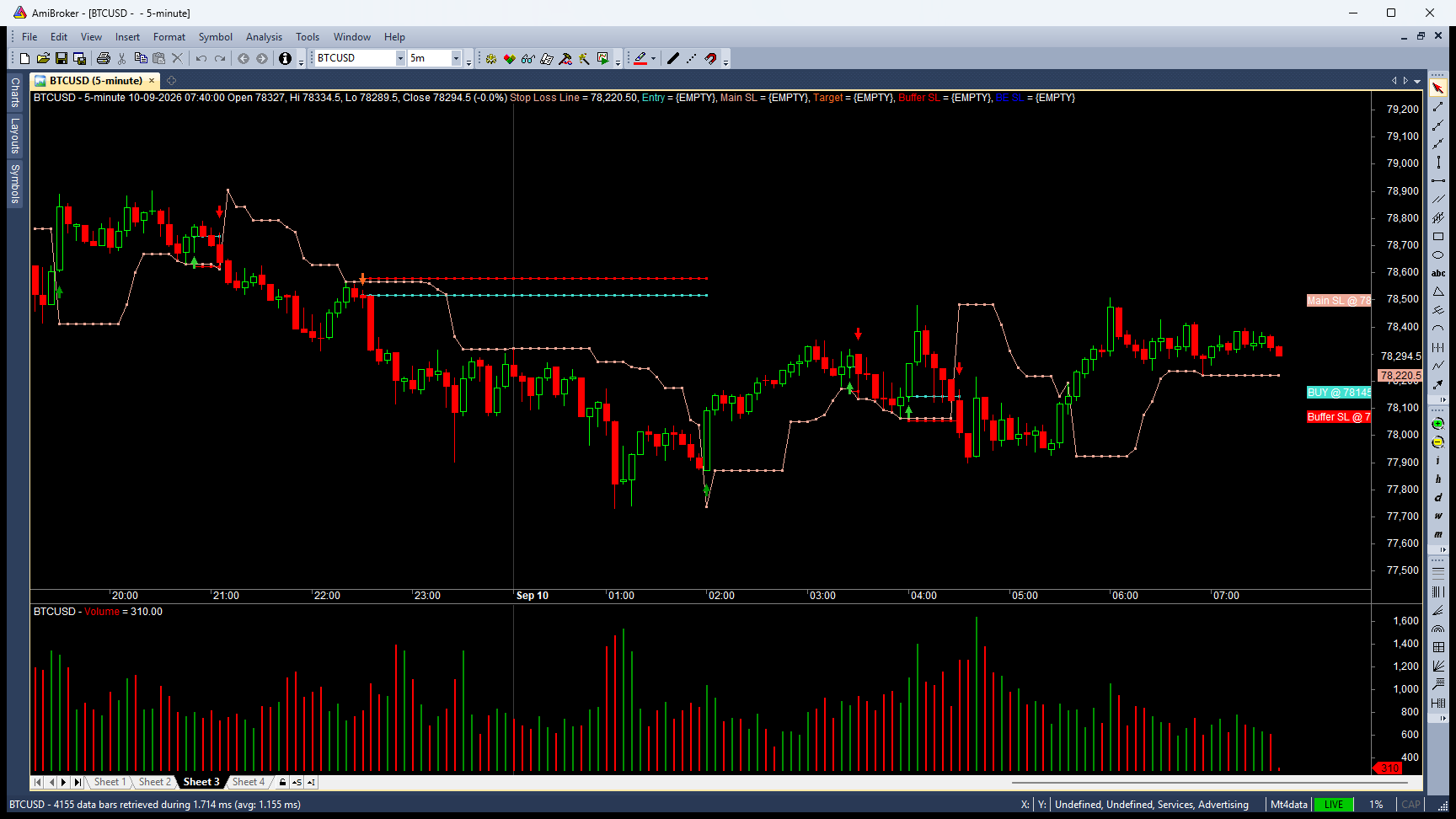
Looking for an MT4 datafeed for AmiBroker or a way to get MetaTrader 4 data into AmiBroker? The MT4 Datafeed plugin turns MetaTrader 4 into your AmiBroker data source — live ticks and full multi-timeframe history flow straight into your charts, scanners and AFL systems. If you have been searching for a reliable AmiBroker MT4 datafeed plugin, MT4 to AmiBroker bridge or an AmiBroker forex data plugin, this is the simplest, lowest-cost option available. Try it free for 24 hours — ₹449/month for India (UPI) or $8/month worldwide (PayPal), with discounted quarterly and yearly plans that save up to about 28%.
What’s Inside
- MT4 Datafeed plugin — a true AmiBroker plugin (
MT4.dll) that reads live and historical data pushed by MetaTrader 4. - MT4Bridge expert advisor — a tiny free EA you attach in MetaTrader 4; it feeds bar data to the plugin (no Python, no third-party services).
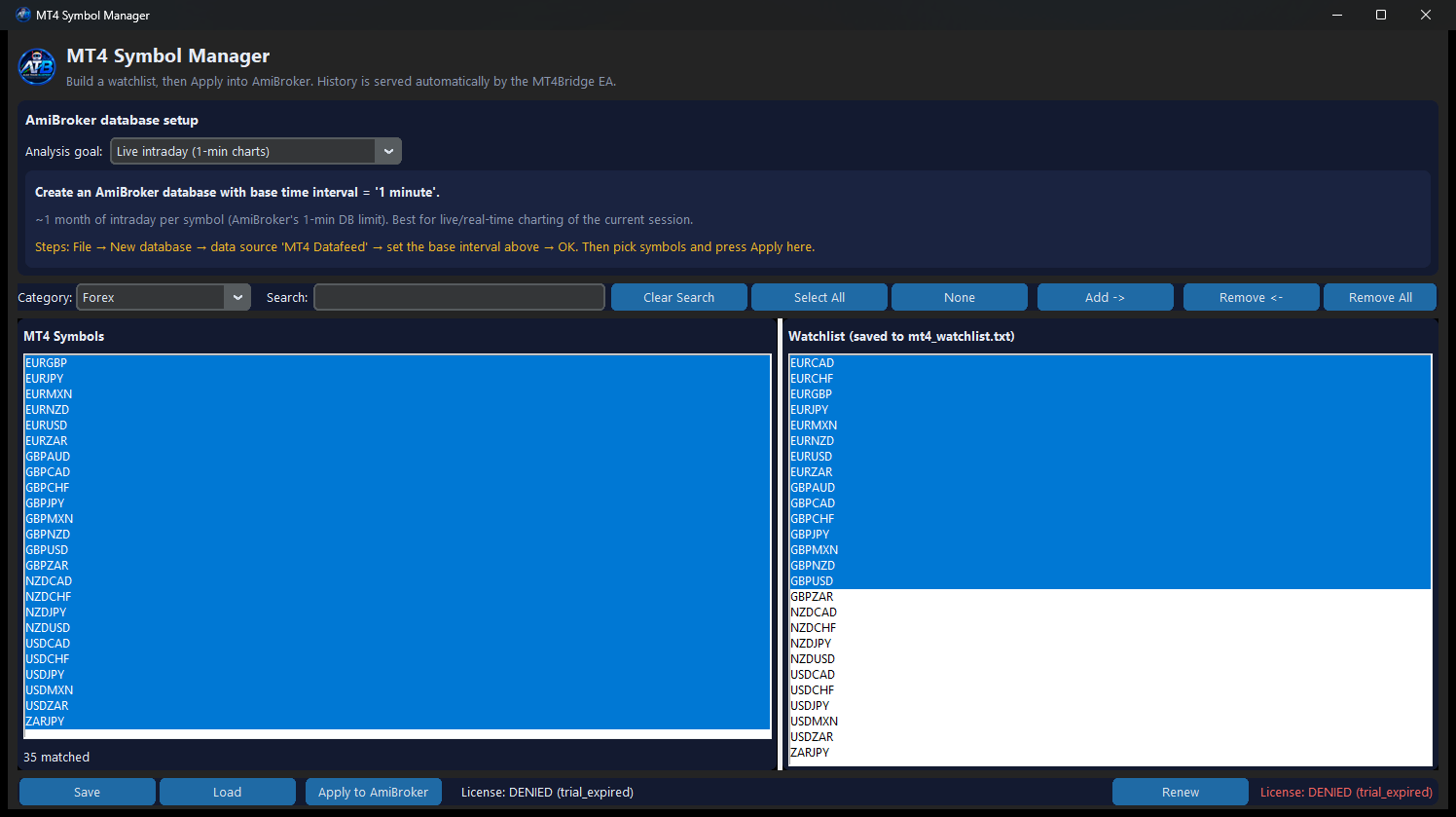
- Symbol Manager — a small GUI to pick MT4 symbols, build a watchlist and apply them into AmiBroker.
- Setup guide + license key — one key unlocks both the plugin and the Symbol Manager.
How It Works
- Attach the included MT4Bridge EA to any MetaTrader 4 chart (one click) — it runs inside your broker’s MT4 terminal and pushes compact binary bar data locally.
- The plugin reads that data directly, so your AmiBroker charts stay in sync with MetaTrader 4 in real time.
- Live candles update continuously; history (1-min, 5-min, 15-min, 1-hour, 4-hour, daily) is served automatically by the EA.
- No CSV exports, no bridge software, no recurring exchange data fees — just your existing MT4 broker connection.
Why Traders Use an MT4 to AmiBroker Datafeed
Real-Time Live Feed
MT4 prices stream into AmiBroker the moment the market moves — ideal for live charts, scanners and intraday systems.
Multi-Timeframe History
M1, M5, M15, H1, H4 and D1 bars with correct higher-timeframe aggregation, so your AmiBroker database always has clean, continuous candles.
Any MT4 Broker, Any Symbol
Forex pairs, metals, indices, energies, crypto and CFDs — whatever your MetaTrader 4 broker provides.
Zero Extra Data Cost
Use the MetaTrader 4 terminal you already have. There is no per-symbol data subscription on top.
Simple Symbol Manager
Search your MT4 symbol list, add only what you trade, and apply the AmiBroker watchlist in one click.
One License for Everything
One key activates the plugin and the Symbol Manager, bound to your machine with a 24-hour free trial before purchase.
Which Markets & Symbols Can I Chart?
The MT4 Datafeed works with whatever your MetaTrader 4 broker offers, so it covers forex, CFDs, metals, crypto and more — any symbol on your broker can become an AmiBroker chart.
- Forex pairs — majors, minors and exotics: EURUSD, GBPUSD, USDJPY, AUDUSD and more, streamed live into AmiBroker with full M1-to-monthly history.
- Gold & precious metals — XAUUSD (gold), XAGUSD (silver) and other metal CFDs, popular for intraday and swing traders.
- Crypto — BTCUSD, ETHUSD and other crypto pairs your broker lists (many MT4 brokers offer bitcoin and altcoin CFDs).
- CFDs & indices — US30, NAS100, S&P 500, DAX and thousands of CFD instruments on shares, indices and commodities.
- Commodities & energies — crude oil (WTI, Brent), natural gas and soft commodities, charted like any other symbol.
- Any MT4 symbol — type it in AmiBroker or add it in the Symbol Manager and it streams in automatically.
Whether you trade AmiBroker forex data, gold (XAUUSD) charts, crypto-to-AmiBroker data or CFD price feeds, this one plugin brings it all in from MetaTrader 4.
Installation Guide
1. Install the plugin
- Close AmiBroker.
- Copy the DLL that matches your AmiBroker into its Plugins folder:
- 64-bit AmiBroker:
C:\Program Files\AmiBroker\Plugins\ - 32-bit AmiBroker:
C:\Program Files (x86)\AmiBroker\Plugins\
- 64-bit AmiBroker:
- Copy
mt4.cfginto the same folder. When you subscribe, paste your license key overATB-XXXXXXXX-XXXXXXXXon thelicense_key=line (the line is already active — do not comment it out).
2. Create an AmiBroker database (so the plugin is the data source)
- In AmiBroker: File → New Database.
- Data source: choose MT4 Datafeed.
- Base time interval: pick the timeframe your charts use:
- Live intraday (1-min charts) → choose 1 minute (the plugin builds every higher timeframe — 5m, 15m, H1, H4, etc. — from the 1-minute bars).
- 15-min / swing analysis → choose 15 minutes (MT4 keeps deep native 15-min history, so a 15-min chart shows months/years).
- 4-hour / swing analysis → choose 1 hour (years of 1-hour data).
- Daily / EOD only → choose 1 day.
- Enter a database path and click OK.
- Open File → Database Settings → Intraday and switch “Use mixed EOD data with intraday” ON, so daily charts keep their full history next to intraday bars.
3. Add the MT4Bridge EA in MetaTrader 4
- Open MetaTrader 4 → File → Open Data Folder →
MQL4\Experts. - Copy the pre-built
MT4Bridge.ex4there (compiled expert advisor — no compilation needed). - Restart MT4 (or right-click Navigator → Refresh), then drag MT4Bridge onto any chart. You should see it running in the Experts tab.
4. Load symbols
- Recommended — Symbol Manager: open
MT4SymbolManager.exe, search the full broker symbol list, pick the symbols you trade, and click Apply to AmiBroker. History is served automatically by the MT4Bridge EA — there is no separate backfill step. - Manual: type a symbol directly in AmiBroker’s symbol box (top-right),
e.g.
XAUUSD,EURUSD,BTCUSD, and press Enter. - Bulk (optional convenience): File → Database Settings → Configure — the plugin adds the symbols currently in your MT4 Market Watch / watchlist in one click. This is not a requirement — you can chart any symbol directly even if it is not in the Market Watch.
- Keep MetaTrader 4 (with the EA attached) running while you use live charts. Stream any symbol by charting it in AmiBroker — it does not need to be added to the MT4 Market Watch first.
FAQ
-
Can I stream gold, forex, crypto or CFDs into AmiBroker?
Yes. The MT4 Datafeed streams any symbol you chart in AmiBroker, so you can chart forex pairs (EURUSD, GBPUSD), gold (XAUUSD), silver (XAGUSD), bitcoin and other crypto (BTCUSD), indices, commodities and CFDs — all with the same live feed and full history.
-
Does this MT4 datafeed work for XAUUSD or crypto?
Yes. Gold (XAUUSD), silver and crypto pairs like BTCUSD/ETHUSD are ordinary symbols in MetaTrader 4, so the MT4 Datafeed pulls them into AmiBroker exactly like forex — live ticks plus multi-timeframe history.
-
Is this the best MT4 datafeed for AmiBroker for the price?
At ₹449/month (India, UPI) or $8/month (global, PayPal) with a free 24-hour trial, it is one of the most affordable ways to feed MetaTrader 4 data into AmiBroker — far cheaper than exchange data subscriptions.
-
Are there discounts for quarterly or yearly plans?
Yes. India (UPI): ₹1,199 per quarter (save 11%) or ₹3,999 per year (save 26%). Worldwide (PayPal): $20 per quarter (save 17%) or $69 per year (save 28%).
-
Does it need Python or a separate bridge program?
No. It is a native AmiBroker plugin that reads data from the MT4Bridge EA inside MetaTrader 4. No Python, no external bridge process.
-
Which AmiBroker version does it support?
Both — the download includes a 32-bit plugin for AmiBroker 6.x and a 64-bit plugin for AmiBroker 7.x (Windows 10/11).
-
Can I try it before paying?
Yes — the download includes a free 24-hour trial per machine. After the trial you need a monthly license to keep live data flowing.
-
Can I cancel my subscription?
Yes, at any time. Your license stays active until the end of the paid period.
Risk Disclaimer
Educational purposes only — not financial advice. Trading involves substantial risk of loss. Test on demo data before live use.